
Knowledge base guide
How to teach your AI: facts vs. instructions
Your assistant only knows what you teach it. The “Teach your AI” page is where you build its brain: you add verified facts it can state with confidence, and instructions that shape how it replies and behaves. This guide explains the difference with examples, and how to add each one step by step.
The idea in one line
A fact answers “what” (the truths about your business); an instruction answers “how” (the way it replies and behaves). Together they make an assistant that answers accurately and in your voice.
The essentials
What’s the difference between a fact and an instruction?
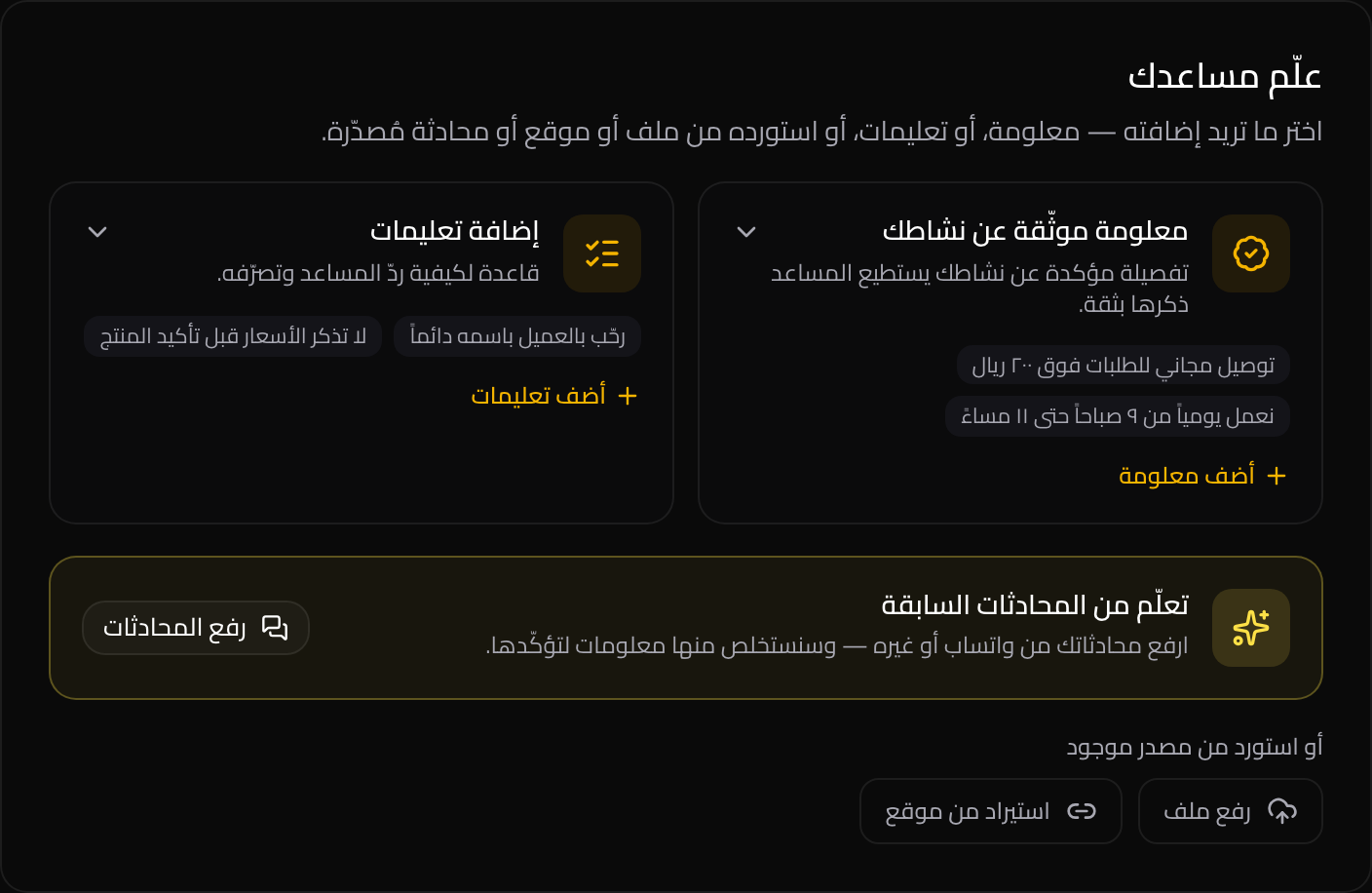
Everything you add is one of two kinds. Telling them apart is the single most important step toward an accurate assistant:
Business Verified Fact
A confirmed, factual detail about your business the assistant can state with confidence — prices, hours, policies, delivery areas.
Answers: what? — the data a customer asks for.
Examples
- نوصّل لجميع مدن السعودية خلال ٢-٤ أيام عملWe deliver to all Saudi cities in 2–4 business days
- التوصيل مجاني للطلبات فوق ٢٠٠ ريالFree delivery on orders over 200 SAR
- نعمل يومياً من ٩ صباحاً حتى ١١ مساءًOpen daily 9 AM–11 PM
Instruction
A behavioral rule for how the assistant should reply and act — tone, what to do or avoid, and when to escalate to a human.
Answers: how? — the way it should respond.
Examples
- رحّب بالعميل باسمه دائماًAlways greet the customer by name
- لا تذكر السعر قبل تأكيد المنتج المطلوبNever quote a price before confirming the product
- حوّل طلبات الاسترجاع أو الشكاوى إلى موظف بشريEscalate returns or complaints to a human agent
The golden rule
Facts = truth. Instructions = behavior. Don’t bury prices or hours inside instructions; add them as facts and let instructions point to them (e.g. “quote the delivery fee as written in the facts”). That way you update one number in one place instead of rewriting every instruction.
Step one
How to add a verified fact
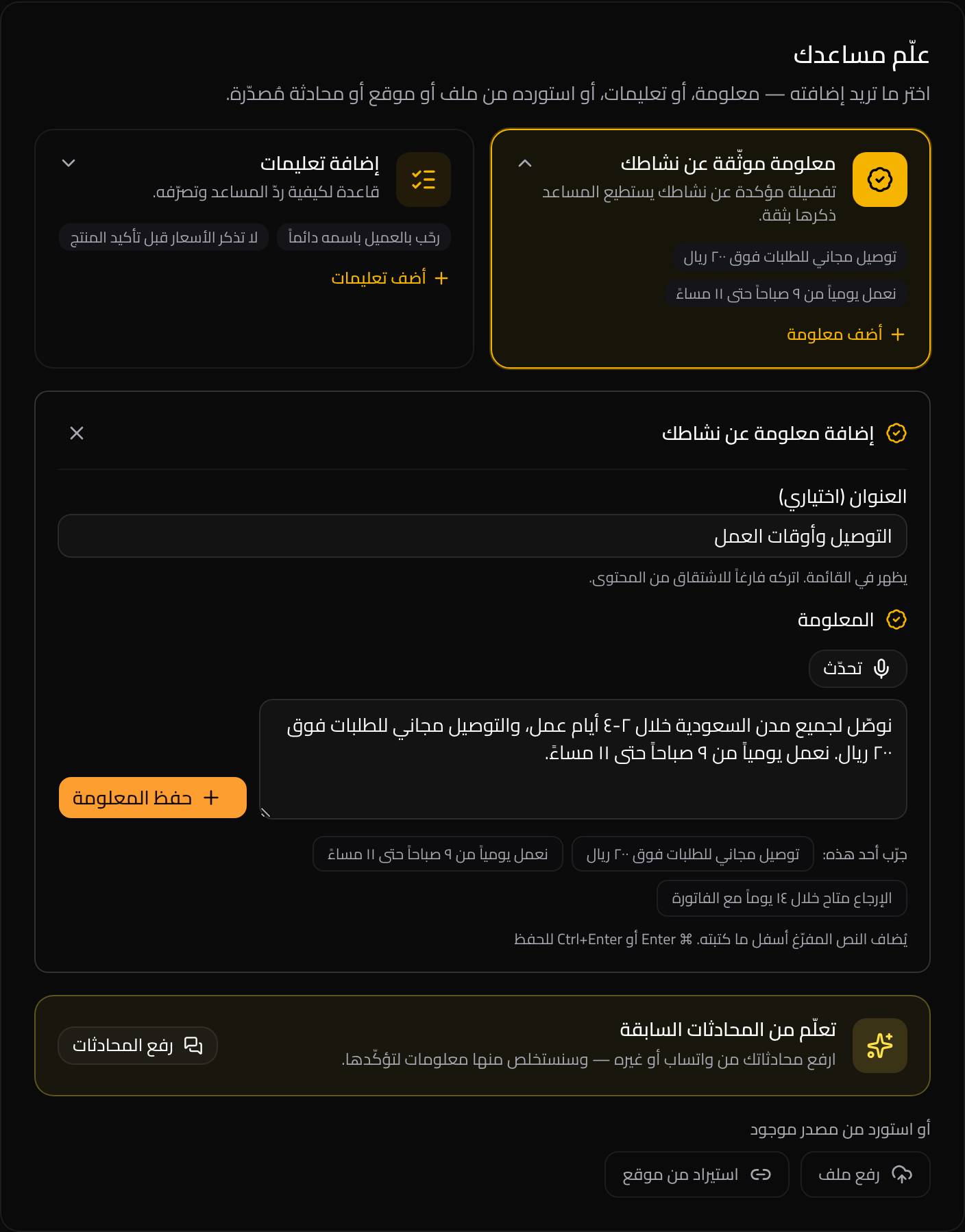
Click “Add a fact” and the form appears. Write the fact as one clear sentence and add a short optional title. Keep each fact to a single idea (one price, one hour, one policy) — that makes it easier for the assistant to retrieve accurately. You can also click a ready example as a starting point.
Examples of verified facts
- نوصّل لجميع مدن السعودية خلال ٢-٤ أيام عملWe deliver to all Saudi cities in 2–4 business days
- التوصيل مجاني للطلبات فوق ٢٠٠ ريالFree delivery on orders over 200 SAR
- نعمل يومياً من ٩ صباحاً حتى ١١ مساءًOpen daily 9 AM–11 PM
- الإرجاع متاح خلال ١٤ يوماً مع الفاتورةReturns accepted within 14 days with the receipt
Step two
How to add an instruction
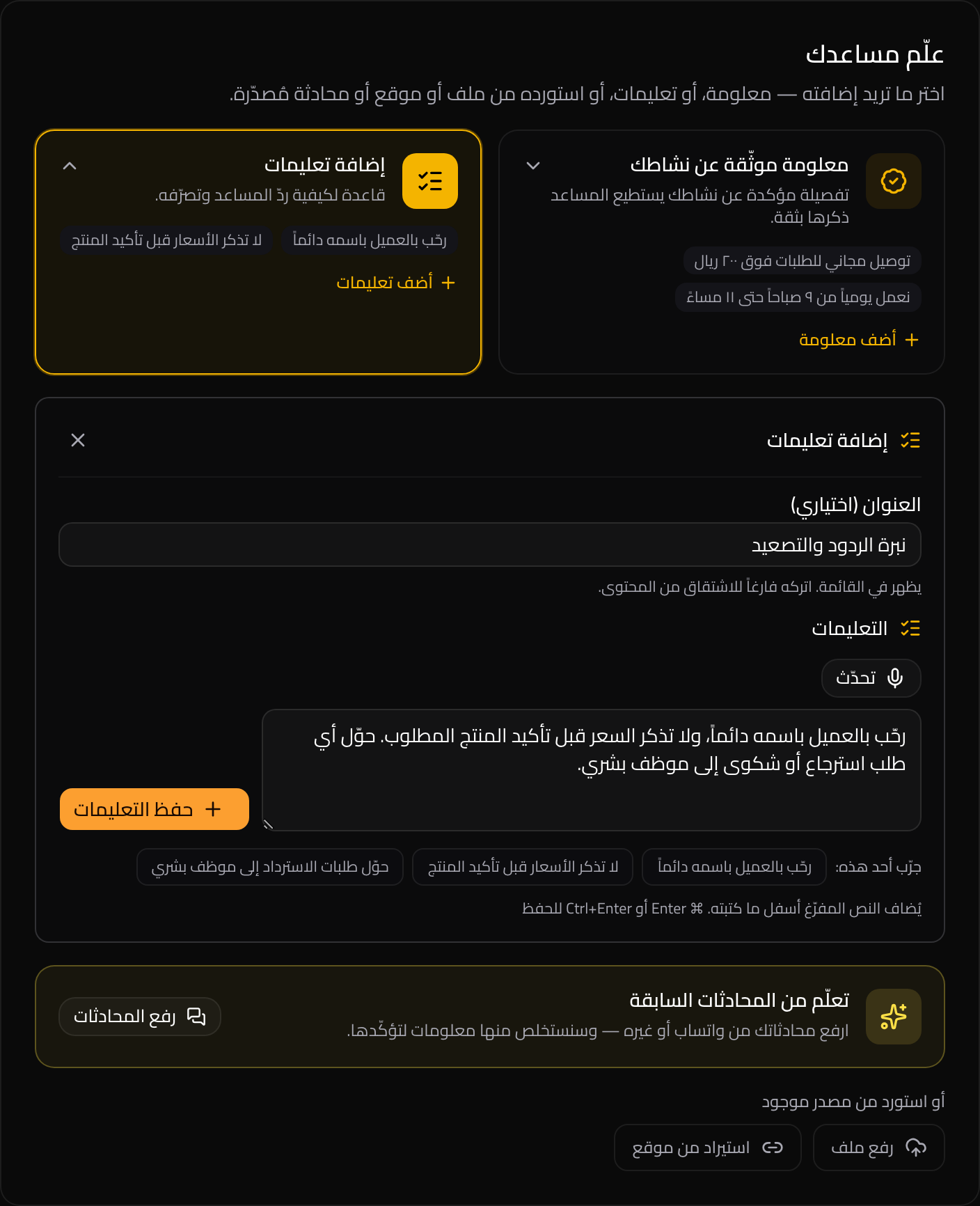
Click “Add an instruction”, then write the rule as a behavior: “do this”, “never do that”, “if this happens, do that”. Focus on style and conduct, not data. A good instruction tells the assistant how to act and leaves the numbers and facts to the facts.
Examples of instructions
- رحّب بالعميل باسمه دائماًAlways greet the customer by name
- لا تذكر السعر قبل تأكيد المنتج المطلوبNever quote a price before confirming the product
- حوّل طلبات الاسترجاع أو الشكاوى إلى موظف بشريEscalate returns or complaints to a human agent
- إذا لم تجد المعلومة، قل إنك ستتأكد من الفريق بدل التخمينIf you don’t have the info, say you’ll check with the team — don’t guess
Shortcuts to get started
Three more ways to feed the assistant
Beyond adding things by hand, you can build knowledge from sources you already have:
Learn from conversations: upload WhatsApp or other chat exports and the system drafts suggested facts for you to approve or reject (Pro feature).
Upload files: add a catalog, price list, or policy document (PDF or Word) and the assistant reads and grounds answers on it.
Import from a website: point to your pages (FAQ, pricing) and the system pulls their content into the knowledge base.
Tips
Best practices
- Keep each fact to one short idea — retrieval gets more accurate.
- Write instructions as behavior, not data. Numbers belong in facts.
- Update a fact the moment a price or hour changes — one source of truth.
- Start fast: upload past chats and let the assistant suggest facts you approve in one click.
Teach your assistant its first fact now
Open the knowledge base, add one verified fact and one instruction, and you’ll see the difference in your assistant’s replies right away.